Whether you're new to affiliate marketing or migrating from another tracker, this guide will help you understand the basics of BeMob and point you to the documentation that best fits your experience.
By the end of this section, you'll know what BeMob is and how it works, understand the most important tracking concepts and terminology and get ready to start your first ad campaign.
¶ What Is BeMob?
BeMob is a cloud-based performance tracking platform. Its main purpose is to bring advertising traffic, cost and conversion data together in one place, allowing users to evaluate their campaigns based on ROI, CPA, revenue, profit and other metrics, and then redistribute traffic based on the collected data.
The tracker sits between the traffic source and the final landing page, offer or your own website.
- Why do people use trackers?
A tracker helps advertisers measure and optimize the performance of their marketing campaigns. It collects data about clicks, visits, conversions, and other events, allowing users to see exactly where their traffic comes from and how it performs.
Unlike individual advertising platforms, a tracker combines data from multiple traffic sources, affiliate networks, and websites into a single dashboard. This makes it easier to analyze campaigns, compare results, automate traffic distribution, run A/B tests, and make data-driven optimization decisions.
- Why isn't an affiliate network report enough?
Affiliate networks only report what happens after a visitor reaches an offer, such as conversions and commissions. They don't provide information about the traffic source, landing page, creative, keyword, or campaign that generated those conversions.
A tracker connects advertising cost data with conversion data, allowing users to calculate important metrics such as ROI, ROAS, CPA, and profit. It also provides detailed reports that help identify which campaigns are successful and which need optimization.
- What problems does BeMob solve?
BeMob centralizes campaign data from traffic sources, affiliate networks, and websites, giving users a complete view of their advertising performance in one place.
It helps marketers identify profitable traffic, automate traffic distribution, test different offers and landing pages, analyze detailed reports, detect invalid traffic, and optimize campaigns using real-time data. By reducing manual work and providing accurate insights, BeMob helps improve campaign efficiency and maximize return on investment.
- What kinds of campaigns can it track?
BeMob can track virtually any online advertising campaign, including affiliate marketing, lead generation, e-commerce, website, and product promotion campaigns.
It supports traffic from push, popunder, native, display, search, social media, email, organic, and many other traffic sources. Whether you're promoting affiliate offers, websites, or online services, BeMob provides the tools to track clicks, conversions, and overall campaign performance.
¶ Is BeMob Right for You?
If you’re:
- Affiliate Marketers
- Media Buyers
- Agencies
- E-commerce Advertisers
- Lead Generation Businesses
- SaaS Companies
- In-house Marketing Teams
then BeMob is for you.
¶ How BeMob Works
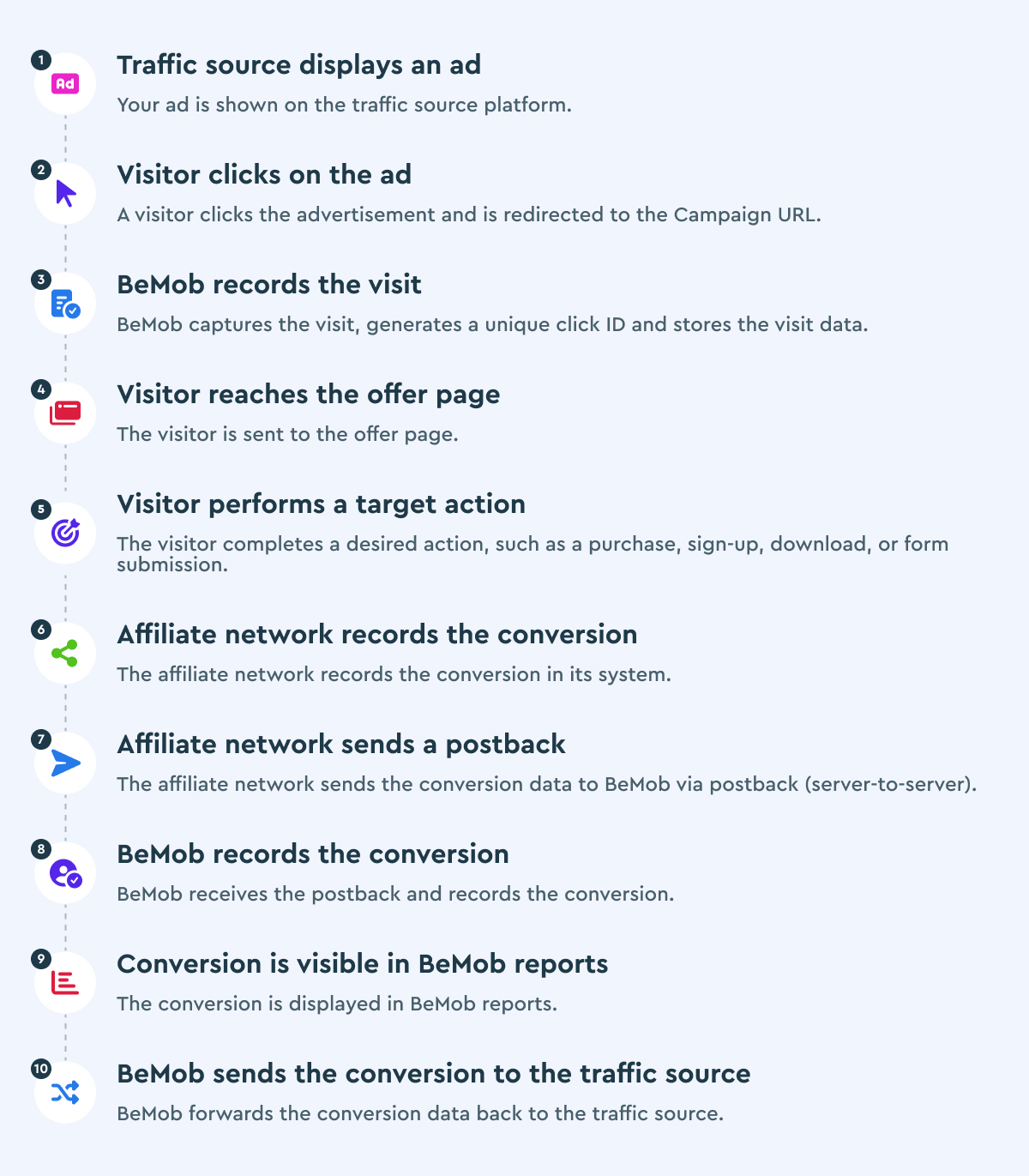
Below you can see the BeMob tracking and conversion flow, from an ad displayed on a traffic source and a visitor clicking it, through visit and conversion tracking, to BeMob recording the conversion and sending it back to the traffic source:
¶ BeMob Terminology
| Term | Definition |
|---|---|
| Campaign | The main BeMob entity that brings together such elements as traffic sources, affiliate networks, offers, landing pages and flows. It is the entry point for incoming traffic going through a Campaign URL. |
| Offer | The advertising link you want to promote, such as an affiliate offer, product page, or website. In BeMob, it is the final destination where conversions are expected to happen. |
| Landing Page | A web page shown to visitors before they reach an offer. It is used to engage visitors, present additional information, or increase the likelihood of a conversion before redirecting them to the final destination. |
| Flow | A campaign destination that defines the path visitors follow after clicking a campaign link. It can contain multiple landing pages, offers, and routing rules, allowing traffic to be distributed based on conditions such as country, device, browser, operating system, ISP etc. |
| Traffic Source | Any resource where you can buy or receive traffic: ad network, website, platform, channel, or organic traffic. It sends visitors to a BeMob campaign, where their interactions are tracked and can ultimately result in a conversion. |
| Affiliate Network | A platform that connects advertisers with affiliates by providing offers that can be promoted for a commission. Once a visitor completes the required action, the affiliate network sends the conversion data to BeMob through a postback or conversion pixel. |
| Conversion | A completed action performed by a visitor, such as a purchase, registration, app download, or form submission. Conversions are recorded in BeMob through postbacks or conversion pixels and are used to measure campaign performance. |
| Click ID | A unique identifier automatically generated by BeMob for every visit, click, and conversion. It allows BeMob to attribute each conversion to the correct campaign, visitor, and click. |
| Postback | A server-to-server request that sends conversion data from an affiliate network or advertiser back to BeMob. It is the preferred conversion tracking method because it is independent of the visitor's browser and provides reliable attribution. |
| Token/Macro | A placeholder that is automatically replaced with actual data, such as a click ID, campaign name, country etc. Tokens are commonly used in tracking URLs and postbacks to pass data between BeMob, traffic sources, and affiliate networks. |
| Redirect | The process of automatically sending a visitor from the Campaign URL to the selected landing page or offer. During the redirect, BeMob generates a click ID, records visits and clicks, and routes visitors according to the traffic distribution rules. |
| Domain | The hostname used by BeMob to generate tracking links: Campaign URLs, Click URLs, Postback URLs, and tracking pixels. BeMob supports both system and custom domains, which are connected through a CNAME record. |
Now that you're familiar with the basics of BeMob and how campaign tracking works, it's time to create your account.
Continue to the next guide to learn how to register, verify your account, and complete the initial setup before launching your first campaign.
📩 Need help? Contact support via live chat or email at support@bemob.com